Breaking

Page is under development
Showing posts with label Learn. Show all posts

Sunday, July 26, 2020

July 26, 2020

Learn how to know weather your e-mail id has been breached or not.

Now a days data breaching is taking in a huge number . In this article we will show you weather your e-mail id has been leaked or not.
 
To do this task we will use a website called as "Have I Been Pwned" this website help you to know weather your personal data has been leaked or not.(link is provided below)
     
                                    ------------   https://haveibeenpwned.com/      -----------


The steps are simple just enter your e-mail id and press enter. It will show weather your e-mail has been pwned or not.


We hope this article was helpful was you.

Saturday, July 25, 2020

July 25, 2020

Learn how to make a temporary e-mail for free

When we do surfing in internet we come across several websites which ask for email to get there services. But, we find it uncomfertable because if we give our personal e-mail then the perticular website would know your information.


So,in this article we are going to see a trick in which you can make a temporary e-mail for a single use.

To do so first we have to open a website called- 10minutemail.com. (link is provided below)
                                  
                                             --------       https://10minutemail.com/      --------


With the help of this site we can make a temporary e-mail which will be valid for 10 minutes. If you want to extend its time period then simply click on the"GEt 10 more minutes" button to exted the time period.

This is a simple trick which you can learn to use in daily internet surfing.


We hope this article was helpful for you & you were able to learn a new trick.

Sunday, July 14, 2019

July 14, 2019

Learn How to identify virus in a file or url

Wondering whether the file you're downloading is safe or not? Does it contain malware n all.  In this article i will show you how you can easily identify virus ,so.. lets learn how to know to identify a virus.

To do so you have to go to the following site

https://www.virustotal.com/gui/home/upload

In this website u can check for virus by uploading file or by url. After uploading your file/url click on reanalyse and all done with in few seconds you can see whether the virus is there or not.
STEP 1-visit the website


STEP 2- upload file/url


STEP 3- DONE!!


Hope you guys liked this article.

Saturday, May 25, 2019

May 25, 2019

Learn how to prevent these pc mistakes we usally do

Now a days computer & laptops are Bing common everywhere. You can see people using pc's and committing few mistakes which causes in computer performance. Here are few mistakes which you may have done in your past. So, let's learn 7 mistakes that we usually do.


1.Installing cracked softwares/os
Usually all of like to use free software. But if you save important file’s, bank details or any confidential documents. Then I would strongly recommend you to use genuine software’s. Because  in future your pc may get affected by virus, may be hacked by any person to tamper your documents.

2.Not giving enough space for C-drive
While you start to install a lot software’s on your pc, then you suddenly encounter a problem of low space in your c drive.  It is a very minor mistake that people committee to get out of this problem. I would recommend you to give at least 120-150Gb of space for c drive.

3.Don’t download any software, rar file etc. from third party sites
  There a lot of third party websites which have virus or any malware in there downloads. This will ultimately led to crashing your pc or even getting hacked!! To prevent these try to download from its official website or any third party website. “it doesn’t mean that every third party site has virus with there downloads”.

4.Clicking on fake warning sites
While using net browser most od us may have encountered by such  pages for eg. “your pc is going to corrupt in 4mins 58secs please follow these tips to save your pc” . Generally new users follow these steps and get affected by any virus/malware. When ever you go through such pages just close that tab as fast as possible that’s it!!

5.Always cover webcam when not in use
There are lots of hacker who are trying to use your personal pictures/videos for bad purposes or blackmailing you. So, whenever you don’t have the need of a webcam cover it with a cloth of or with tape .

6.Saving important documents on home screen
On reading it may seem as a very small mistake but it may lead to a big problem. When you save a file on home screen it ultimately saves in C drive. Suppose suddenly your OS got crashed, then you have to format C drive for installing the new OS . So, this will let you to lose that file/document. It is preferred to save file in any other drive.

7.Over installing softwares
  When you use a new pc it works in lightning speed. But, after few months/year’s the lighting speed switches into turtle speed. It is due to over installing software’s on a pc. So, it’s a tip to uninstall all that software’s which you don’t use at all.

These are the few mistakes generally a lot of people commit with there solutions. Hope you like these article.

Wednesday, May 22, 2019

May 22, 2019

How to know monthly stats of a youtube channel

So guys are you intrested to know the stats of a youtube channel? If you  are interested in things like when they started,monthly income,monthly views e.t.c. So today we will see how to know monthly stats of a youtube channel.
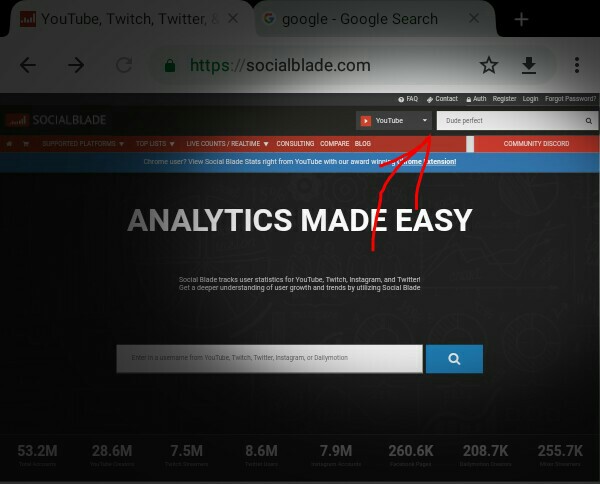
So all that you have to do is visit this website
After visiting this website in search option type the name of the youtuber then a list of YouTube channels will appear select the channel who’s stats u wanna see.
                            https://socialblade.com/
                                             
STEP 1-VISIT THE WEBSITE AND SEARCH THE CHANNEL


STEP 2- find the channel


STEP 3- Done!!!

Thankyou for reading this article


May 22, 2019

How to make text to speech software using notepad

Notepad is one of those software’s which we use in our daily life. But, have you ever imagined that u can make a software using notepad!! So we can make a tts software using notepad.
So type the following codes in notepad or simply copy past it.

Dim message, sapi
message-InputBox("What do you want me to say?" Speak to Me")
Set sapi-CreateObject( sapi.spvoice")
sapi.Speak message
                                          ××××××××
After typing this save text as .vbs  (eg:tts.vbs)

I hope this article was helpful for you.