Breaking

Page is under development
Showing posts with label Tricks. Show all posts

Saturday, July 25, 2020

July 25, 2020

Learn how to make a temporary e-mail for free

When we do surfing in internet we come across several websites which ask for email to get there services. But, we find it uncomfertable because if we give our personal e-mail then the perticular website would know your information.


So,in this article we are going to see a trick in which you can make a temporary e-mail for a single use.

To do so first we have to open a website called- 10minutemail.com. (link is provided below)
                                  
                                             --------       https://10minutemail.com/      --------


With the help of this site we can make a temporary e-mail which will be valid for 10 minutes. If you want to extend its time period then simply click on the"GEt 10 more minutes" button to exted the time period.

This is a simple trick which you can learn to use in daily internet surfing.


We hope this article was helpful for you & you were able to learn a new trick.

Wednesday, May 29, 2019

May 29, 2019

Trick to make a fake virus!!

Hey guys have you ever wanted to prank a guy with a fake virus, if yes here is a trick to make a fake virus that "deletes" everything and make it look very inconspicuous


this DOES NOT delete your files

txt tutorial:
1.Open WordPad. (it shouldn't matter if its notepad or WordPad)

2.Copy and paste the code below. (after all of the "echo's, u can write whatever u want.)
[u can also delete some of the "dir/s's to reduce how long the "deleting" portion takes.

3.Add ".bat" at the end of the name of the file when u save it.
and change the file type to "Text Document - MS-DOS Format".

4.Make a shortcut for it on the desktop by right-clicking on the file and click "create shortcut.

5.In the shortcut tab, click on "change icon and find an icon to a program that they use a lot.

6.In options tab, change it to full-screen.
in colors, change the screen text to white and the screen background to dark blue.
(the blue further to the left)

have fun!

Here’s the code
 @echo off
echo
echo WARNING! A VIRUS HAS BEEN DETECTED ON YOUR COMPUTER!
pause
echo FILE RECOGNIZED AS SISDPYGnfg32.bat
pause
echo CONTACTING ANTIVIRUS
pause
echo WOULD YOU LIKE TO DELETE THE VIRUS? (y/n)
pause
echo ANTIVIRUS HAS BEEN MANUALLY SHUT DOWN!
pause
echo VIRUS HAS PROGRESSED TO C:/ DRIVE!
pause
echo FILES IN C:/ WILL BE DELETED!
pause
echo PRESS ANY KEY TO PREVENT FILE DELETION!
echo PRESS ANY KEY TO PREVENT FILE DELETION
echo PRESS ANY KEY TO PREVENT FILE DELETION!
pause
echo FILES IN C:/ DRIVE ARE BEING DELETED!
pause
dir/s
dir/s
dir/s
dir/s
dir/s
dir/s
dir/s
dir/s
dir/s
dir/s
dir/s
dir/s
dir/s
dir/s
dir/s
dir/s
dir/s
dir/s
dir/s
dir/s
dir/s
dir/s
dir/s
dir/s
dir/s
dir/s
dir/s
dir/s
dir/s
dir/s
dir/s
dir/s
dir/s
dir/s
dir/s
dir/s
dir/s
dir/s
dir/s
dir/s
dir/s
dir/s
dir/s
dir/s
dir/s
dir/s
dir/S
dir/s
dir/s
dir/s
dir/s
dir/s
dir/s
dir/s
dir/s
dir/s
dir/s
dir/s
dir/s
dir/s
dir/s
dir/s
dir/s
dir/s
dir/s
dir/s
dir/s
dir/s
dir/s
echo
pause
echo JUST KIDDING! NOTHING HAS BEEN DELETED
pause
echo
echo DON'T BE MAD AT ME...
pause

                                    ------------------------------

If you found this article share with your friends and comment on this article

Wednesday, May 22, 2019

May 22, 2019

How to know monthly stats of a youtube channel

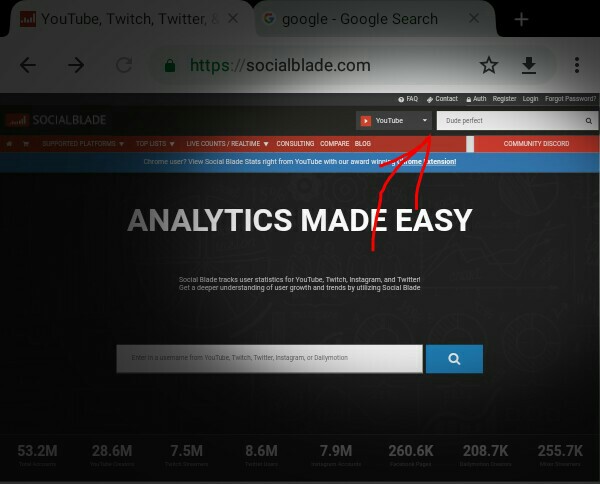
So guys are you intrested to know the stats of a youtube channel? If you  are interested in things like when they started,monthly income,monthly views e.t.c. So today we will see how to know monthly stats of a youtube channel.
So all that you have to do is visit this website
After visiting this website in search option type the name of the youtuber then a list of YouTube channels will appear select the channel who’s stats u wanna see.
                            https://socialblade.com/
                                             
STEP 1-VISIT THE WEBSITE AND SEARCH THE CHANNEL


STEP 2- find the channel


STEP 3- Done!!!

Thankyou for reading this article


May 22, 2019

How to unblock blocked website - 10 tricks

Bans over websites are always annoying, and governments are now censoring content more than ever. Moreover, if you also feel stifled by the blocked websites , here are some ways to access blocked websites.


Check out the 10 easy ways to bypass the censorship to access blocked websites. These easy-to-use and effective methods include the use of VPN, extensions, proxy websites, and others. Let’s tell you about them:


1. Use VPN for unblocking
VPN (Virtual Proxy Network) allows you to connect your device to a secure connection to another network over the internet. Thus, it enables you to access blocked websites from your home network and puts your IP address in a land far away. You can also download the apps, open the sites blocked in your country, or use it as a way to unblock sites in school.
VPN acts as a tunnel that converts your data into garbage value that’s difficult for anyone to sniff and recognize. There are tons of free/cheap VPN services that one can use and enjoy an uninterrupted internet experience

• PIA (Private Internet Access)
• ExpressVPN
• NordVPN

2. Become Anonymous: Use Proxy Websites
Very often, in a professional environment, employers draw certain boundaries, restricting your access to some particular websites like video streaming, social networking, or even personal emails. At times, you need a way to access the blocked websites and in those situations, proxy websites act as a rescue method. However, do note that an unblock proxy isn’t as secure as a VPN. So, if you’re really secretive about your work, #1 method is the one to choose.
On the web, there are hundreds of proxy websites that make your web experience ‘unrestricted’. A proxy website camouflages the blocked site from the ISPs and allows you to access blocked websites.
Eg: In case Facebook is blocked in your institution, or you can go to and enter the blocked URL to access the service —
     
        kproxy.com
• Spysurfing.com

3. Use IP Rather Than URL
Each website’s URL has an IP address and the authorities blocking the site might have just stored the URL instead of the IP. In that case, our quest of how to unblock websites might end here. To get the IP address for any website, you do a ping domain(dot)com command in Command Prompt. Using IP is a simple way to access blocked websites in your region. However, if the website had hidden its IP too, then it won’t open with this method.
All you need to do is run CMD on your computer. Now type “ping www.websitename.com” and press Enter. This will promptly return the IP address. Now enter this IP address in your web browser’s address bar and hit Enter to visit “access denied” websites. Similar tools and commands can also be used on other platforms like Mac, Linux, Android, etc.

4. Change Network Proxy In Browsers
 So, it happens that some websites are restricted on one proxy, but accessible in another. So, you can give a try to proxy surfing to access blocked websites.
Disabling the network proxy settings in our web browsers isn’t a tough task. You just need to find the connections/network option in the settings of your web browser. There, you can select the no proxy option or use another one that’s providing unrestricted browsing at your institution. For example, here’s a settings window showing how you can change the settings in the Firefox web browser:

5. Use Google Translate
Institutes or even countries sometimes don’t ban Google Translate. Probably because it’s an education tool and nobody considers it something powerful enough to unblock sites at school or offices. So, with this tool, you can bypass the restriction by converting the blocked website into some other language that you may know. Try Google Translate and see for yourself. It is yet another simple way to access blocked websites.

6. Bypass censorship via Extensions
If the websites that are blocked by your institute or office are dynamic in nature such as Facebook or YouTube, then you should give a try to these extensions. Hola and ProxMate are some extensions that you can use to access blocked websites on Chrome and other browsers. UltraSurf is one such effective extension that lets you browse freely using its encrypted proxy network. It’s powerful enough to evade lots of power to defeat firewalls like Lightspeed.

7. URL recasting method
There are instances when a particular website is hosted in VPN and it doesn’t have a verified SSL installed. For such websites, you can simply go to the address bar of your web browser and try typing https://www.url.com, instead of accessing www.url.com or http://www.url.com. This change might display a security notice. Press on the Proceed Anyway option and visit the website. This isn’t a full proof method but it could be handy at times.

8. Go to Internet Archive — Wayback Machine
Wayback Machine is an interesting service that stores a copy of most of all website on the internet. It saves multiple versions of a website and you can use it to access the past versions of a website. The users can also use it to browse the blocked content online.
Moreover, this amazing website also contains lots of free movies, documentaries, nostalgic games, eBooks, etc. So, even if some service or websites becomes defunct, Way back Machine has got your back.

9. Use IP Anonymizer like TOR
If you’re a privacy advocate, you might be already knowing about the massively popular Tor browser. This could act as a web blocker bypass tool if you set it up properly. In many cases, you can unblock websites  and remain anonymous as well. There’s a dual advantage as you’d also be able to get rid of any kind of surveillance. After VPN and proxies, using Tor is the most powerful method to unblock sites. It’s also used as a gateway to dark web sites, or .onion sites, which are blocked on your usual web.

Apart from just web blocker bypass, if you are into exploring ways to enhance your computer security, you can also go for the deadly combination of TOR and VPN. Many VPNs like NordVPN and ExpressVPN provide technology like Onion Over VPN, which offer an extra layer of protection.

10. Use Firefox from USB drive
If your school or office is known to take steps to restrict site access, I won’t be surprised you’re not allowed to install extensions on the web browser to open the websites for your personal use. In that case, you can install a web browser like Firefox portable on a USB drive. Couple it with some good unblock proxy service and you’ve got it covered.

These are some of the most effective and easy to use methods to circumvent the censorship that has been put on your favourite websites. Let us know which one do you prefer to access blocked websites in your region.


May 22, 2019

Top 5 cmd tricks to impress your friends(part -1)

Here are the tricks which are easy to remember and impressive…
So lets begin ”-“

1.MATRIX VIRUS
By typing this commands in your notepad you can your cmd panel will be filled with digits (eg:10001001010) this will definitely impress your friends. Note: while saving the text add .bat with the name.(eg: matrix virus.bat)
here is the command

@echo off
color 0a
title ----------Matrixx Virus--------
:top
echo  %random% %random%%random%%random%%random%%random%%random% %random%%random%%random%%random%%random%%random%%random%%random%%random%%random%%random%%random%%random%%random%%random%%random%%random%%random%%random%%random%%random%%random%
goto top


2. TREE
This command will show all the file paths in local disks (eg.C,D,E).The way it shows the files feels like you are hacking. This will blow the mind of your friend completely. More the no. of files more effects it gives.

To execute this you have to open cmd as administrator then write the command tree .


3.TASKLIST
The code is used for knowing the recent tasks done on pc. This command can be used for impressing your friends. To get cooler effect I would recommend you to open lots of folders n stuff.
To execute this command type Tasklist in cmd.


4.SYSTEM INFO
This command enable’s you to know about the whole pc  with os. While performing this command it seems that you are hacking the pc/os . Hence, it is also a great command to impress your friends.
To execute this command you have to type Systeminfo in cmd.

5.HISTORY
This command will show you the recently used commands in cmd.
To use it you have to type Doskey/history .


These are some of the coolest commands which can make your friends head spin around.